slivingdoc
Write in parallel. Persist to S3.
People and agents pull and commit shared notes through MCP or the CLI. slivingdoc merges non-conflicting concurrent changes, reports conflicts, and stores the notebook in your S3-compatible bucket.
slivingdoc pull→ OKslivingdoc commit -m "note"→ OKnpx -y slivingdoc serve
Shared by deployed agents, short-lived runs, and people.

Use cases
One context for every coding agent
Claude Code, Codex, and any other MCP host connect to the same server. Context written in one session is there in the next, whichever harness runs it.
Connect an MCP host →Shared state for production agents
Agents in production keep dynamic context in the notebook: what a customer needs, how far an investigation got, what was already tried. Context too loose for a schema stays plain text.
How it works →Fleets that report back
Spawn a large fleet and confine each agent to its own directory. Every agent commits its report, and a human pulls the notebook to read them all in one place.
Writable paths →Prompts you change at runtime
Serve instructions to agents from read-only paths. Edit them from the command line, and every agent reads the new version on its next pull, with no redeploy.
Read-only paths →Memory for short-lived runners
CI jobs, scheduled agents, and sandboxes lose their disk after every run. The notebook lives in the bucket, so the next run starts where the last one stopped.
From scripts and cron →Notes between people and machines
Colleagues, and your own computers, pull and commit the same notebook from the command line and edit it with any editor.
Share a directory →
How it works
One notebook, many agents — and their humans. Two operations.
pull
Pull the notebook into a directory
pullmcp:notes_pull()→ OKcli:slivingdoc pull→ OK reads the accepted state from the bucket — one small manifest called current, plus the immutable packs it references — and writes the notebook into your directory as ordinary UTF-8 text files.
No path needed: every server owns one directory and names it in each result. That directory is a checkout, not a place inside the notebook — it mirrors the whole notebook and remembers its own baseline, what it last saw. Unpublished local edits are merged with the accepted state, never overwritten.
The caller never sees Git object IDs, pack names, or S3 keys. The directory is the whole interface.
Read more: How it works →
edit
Edit with ordinary file tools
Between calls there is no protocol at all. Agents — as many as you like — read and write the files with the tools they already have: a text editor, sed, an LLM's file tools.
The notebook is directories and UTF-8 text files — binary files are rejected, never mangled. Bytes and line endings are preserved. slivingdoc does nothing until the next call.
Humans can work in the same directory: open the notebook in your editor and write alongside your agents. It is perfectly possible to use slivingdoc as an agent-free distributed notebook too.
Read more: Share a directory with humans →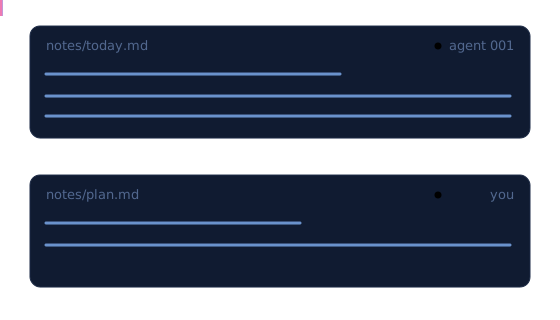
commit
Commit publishes your changes
commitmcp:notes_commit(message)→ OKcli:slivingdoc commit -m "note"→ OK merges your files with the latest accepted state, packs the result, and uploads the pack. Packs are immutable: uploading one publishes nothing.
Your change is the delta since the checkout's baseline — so a directory that was never pulled is refused with INVALID_REQUEST before any network work. Pull once first: commit publishes intent, not a guess.
Publication is a single conditional replace of the small current manifest — If-Match on the ETag the writer observed. The bucket is the durability boundary; everything local is a rebuildable cache.

race
Concurrent writers cannot clobber each other
Two agents commit at once. Both observed current at the same ETag; S3 accepts exactly one replacement for it. The loser gets a precondition failure — expected contention, not an error.
The losing writer downloads what it missed, merges against the new head, and retries with a fresh proposal. No lock object, no lease, no clock. Accepted state is never silently overwritten.
Read more: Storage model →
conflict
Conflicts are just text
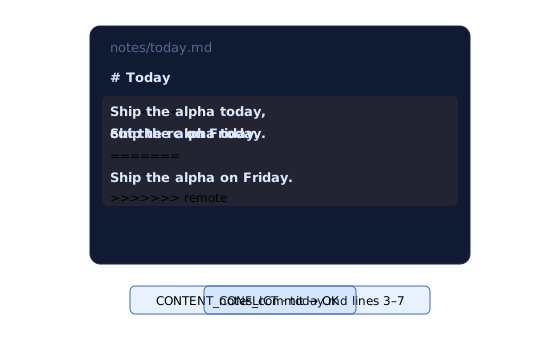
When your change and an accepted remote change touch the same lines, the call returns CONTENT_CONFLICT and writes standard conflict markers into the affected files. The structured error names every file and marker line range.
Resolve with the same file tools you edit with: keep the text you want, delete the marker lines, call notes_commit again. A complete marker block is never accepted into the notebook.
checkpoint
Checkpoints keep cold starts fast
Every commit uploads one small incremental pack. Left alone, that chain would make a fresh server download a growing number of objects. So after a configurable count, slivingdoc compacts the stable prefix into one complete-state checkpoint — see Configuration for the exact default.
A new reader needs one checkpoint plus the short tail after it. Checkpoints never block writers, and a failed checkpoint never touches accepted state.
Read more: Storage model →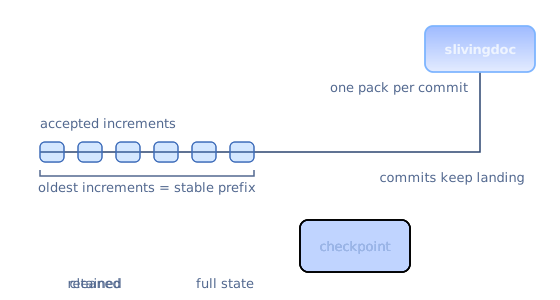
Get started
An S3-compatible bucket and a supported Node.js runtime — see Installation. Works in any MCP host, or with none at all: the same binary is a CLI.
Point it at a bucket
That is the whole configuration. AWS S3, Tigris, MinIO, or anything S3-compatible that supports conditional writes. Credentials come from the normal AWS chain.
Add it to your MCP host
The npm launcher downloads the right native binary for your platform, verifies its checksum, and runs it. No Git, no toolchain.
Let agents pull and commit
Two tools, no arguments to coordinate, plain files,
OKon success. Conflicts come back as editable text, never as a stuck state.
Raw MCP configurationfor any compatible host
{
  "mcpServers": {
    "slivingdoc": {
      "command": "npx",
      "args": ["-y", "slivingdoc", "serve"],
      "env": {
        "SLIVINGDOC_BUCKET": "my-notes",
        "AWS_ACCESS_KEY_ID": "<your-access-key-id>",
        "AWS_SECRET_ACCESS_KEY": "<your-secret-access-key>",
        "AWS_REGION": "us-east-1"
      }
    }
  }
}
Each server takes its own scratch directory and discards it on exit — the notebook lives in the bucket. Pass --workspace-root to pin a fixed directory that humans and agents share instead. PreferAWS_PROFILE over pasted keys when ~/.aws is configured, and for a non-AWS store add AWS_ENDPOINT_URL_S3.
claude mcp add slivingdoc \
  --env SLIVINGDOC_BUCKET=my-notes \
  --env AWS_ACCESS_KEY_ID=<your-access-key-id> \
  --env AWS_SECRET_ACCESS_KEY=<your-secret-access-key> \
  -- npx -y slivingdoc serve
Defaults to local scope: this project only, in ~/.claude.json. Add --scope project for a shared .mcp.json, or --scope user for every project. See the MCP hosts guide.
codex mcp add slivingdoc \
  --env SLIVINGDOC_BUCKET=my-notes \
  --env AWS_ACCESS_KEY_ID=<your-access-key-id> \
  --env AWS_SECRET_ACCESS_KEY=<your-secret-access-key> \
  -- npx -y slivingdoc serve
Stored in ~/.codex/config.toml under [mcp_servers.slivingdoc]. Verify with /mcp. See the MCP hosts guide.
gemini mcp add -s user \
  -e SLIVINGDOC_BUCKET=my-notes \
  -e AWS_ACCESS_KEY_ID=<your-access-key-id> \
  -e AWS_SECRET_ACCESS_KEY=<your-secret-access-key> \
  slivingdoc npx -- -y slivingdoc serve
Written to ~/.gemini/settings.json; drop -s user for a per-project .gemini/settings.json. See the MCP hosts guide.
{
  "mcp": {
    "slivingdoc": {
      "type": "local",
      "command": ["npx", "-y", "slivingdoc", "serve"],
      "enabled": true,
      "environment": {
        "SLIVINGDOC_BUCKET": "my-notes",
        "AWS_ACCESS_KEY_ID": "<your-access-key-id>",
        "AWS_SECRET_ACCESS_KEY": "<your-secret-access-key>"
      }
    }
  }
}
Goes in opencode.json at the project root, or globally in ~/.config/opencode/opencode.json. See the MCP hosts guide.
pi install npm:pi-mcp-adapter
pi has no built-in MCP. The adapter reads the standard .mcp.json — paste the configuration below into your project's .mcp.json and restart pi. See the MCP hosts guide.
export SLIVINGDOC_BUCKET=my-notes
npx -y slivingdoc pull notes
# edit UTF-8 text files under notes/
npx -y slivingdoc commit notes -m "meeting summary"
The same two operations, driven by hand — humans and cron jobs share the notebook without an MCP host. Same flags and environment as serve. See the MCP hosts guide.
No bucket yet? Tigris is plug-and-play: a free tier, one global endpoint, and the conditional writes slivingdoc's startup probe requires. Set AWS_ENDPOINT_URL_S3 to https://t3.storage.dev and AWS_REGION to auto. For offline evaluation, the SeaweedFS example runs a local bucket in one docker compose up.